
Chevrolet Trax: Rear wheel speed sensor replacement
Chevrolet Trax (2013-2022) Workshop Manual / Brakes / Antilock Brake System / Repair instructions / Rear wheel speed sensor replacement
Removal Procedure
WARNING: Refer to Brake Dust Warning .
- Raise and support the vehicle. Refer to Lifting and Jacking the Vehicle .
- Remove the tire and wheel assembly. Refer to Tire and Wheel Removal and Installation .
- Remove the rear wheelhouse panel liner. Refer to Rear Wheelhouse Liner Replacement .
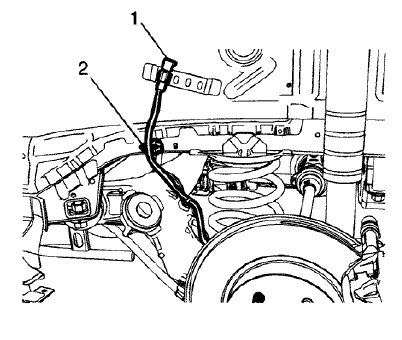
Fig. 34: Wheel Speed Sensor Electrical Connector
- Disconnect the wheel speed sensor electrical connector (1) and release the connector clip from the wheelhouse bracket.
- Release the wheel speed sensor harness clip (2) from the wheelhouse panel.
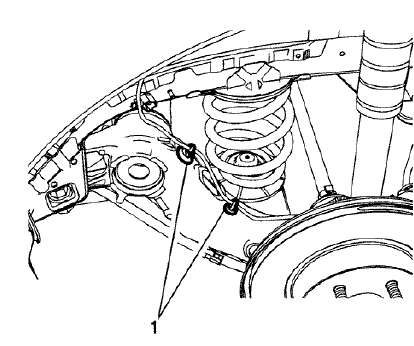
Fig. 35: Wheel Speed Sensor Harness Clips
- Release the wheel speed sensor harness clips (1) from the rear axle.
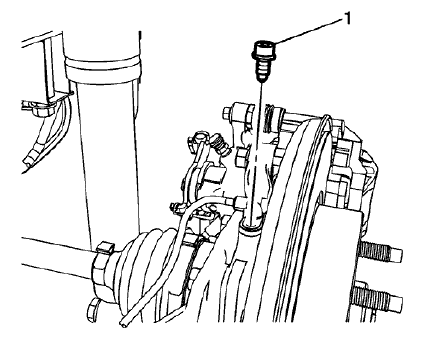
Fig. 36: Wheel Speed Sensor Bolt
- Remove the wheel speed sensor bolt (1).
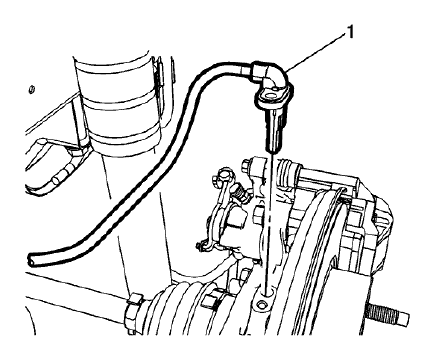
Fig. 37: Wheel Speed Sensor
- Remove the wheel speed sensor (1) from the rear suspension knuckle.
Installation Procedure
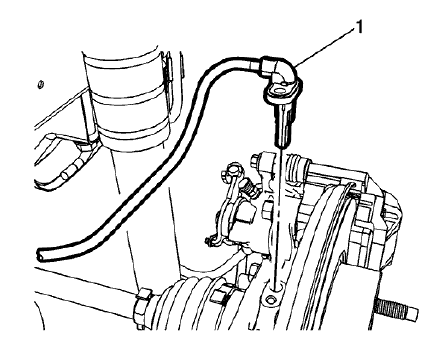
Fig. 38: Wheel Speed Sensor
- Install the wheel speed sensor (1) to the rear suspension knuckle.
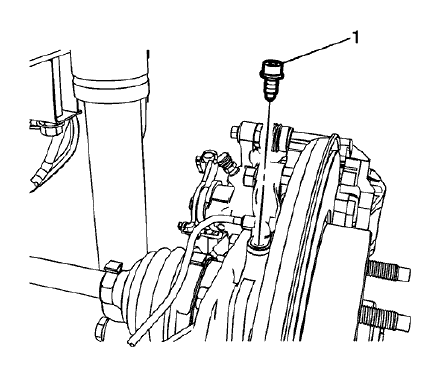
Fig. 39: Wheel Speed Sensor Bolt
CAUTION: Refer to Fastener Caution .
- Install the wheel speed sensor bolt (1) and tighten to 8 N.m (71 lb in).
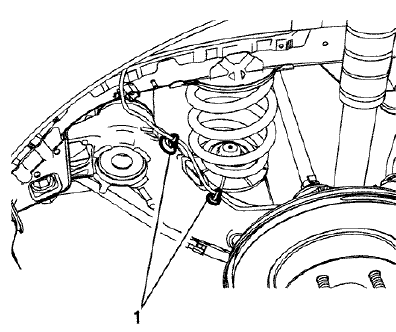
Fig. 40: Wheel Speed Sensor Harness Clips
- Install the wheel speed sensor harness clips (1) to the rear axle.
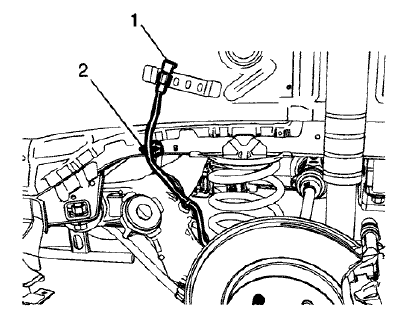
Fig. 41: Wheel Speed Sensor Electrical Connector
- Connect the wheel speed sensor electrical connector (1) and install the connector clip to the wheelhouse bracket.
- Install the wheel speed sensor harness clip (2) to the wheelhouse panel.
- Install the rear wheelhouse panel liner. Refer to Rear Wheelhouse Liner Replacement .
- Install the tire and wheel assembly. Refer to Tire and Wheel Removal and Installation .
- Perform the diagnostic system check. Refer to Diagnostic System Check - Vehicle .
READ NEXT:
 Vehicle stability control system switch replacement
Fig. 42: Vehicle Stability Control System Switch
Vehicle Stability Control System Switch Replacement
VEHICLE YAW SENSOR LEARN
The yaw rate sensor learn procedure can be completed with a scan tool
Description and operation
ABS DESCRIPTION AND OPERATION
Antilock Brake System Block Diagram
Fig. 45: Antilock Brake System Block Diagram
This vehicle is equipped with the MGH 60 Mando electronic stability control
brake
SEE MORE:
DTC B242A (WITHOUT MEMORY A45): Seat heaters common circuit
Diagnostic Instructions
Perform the Diagnostic System Check - Vehicle prior to using this
diagnostic procedure.
Review Strategy Based Diagnosis for an overview of the diagnostic
approach.
Diagnostic Procedure Instructions provides an overview of each diagnostic
category.
DTC Descriptors
D
DTC C025E: Brake booster vacuum sensor/brake booster vacuum pump
Diagnostic Instructions
Perform the Diagnostic System Check - Vehicle prior to using this
diagnostic procedure.
Review Strategy Based Diagnosis for an overview of the diagnostic
approach.
Diagnostic Procedure Instructions provides an overview of each
diagnostic category.
DTC Descriptors
D
© 2019-2026 Copyright www.chevtrax.com
