
Chevrolet Trax: Radio(s)
Radio Controls without Touchscreen
 /VOL: Press to turn the system
on and off. Turn to increase or
decrease the volume.
/VOL: Press to turn the system
on and off. Turn to increase or
decrease the volume.
RADIO/BAND: Press to select AM, FM, or SiriusXM (if equipped).
 Seek
Seek
 : Press to seek the
previous or next station.
: Press to seek the
previous or next station.
Buttons 1−6: Press to save and select favorite stations.
INFO: Press to view current radio information.
For more information about these and other radio features, see Operation
Storing a Favorite Station
Stations from all bands can be stored in the favorite lists in any order. Up to six stations can be stored in each favorite page and the number of available favorite pages can be set.
To store the station to a position in the list, press the corresponding button 1−6 until a beep is heard.
See "Storing a Station as a Favorite" in AM-FM Radio
Radio Controls with Touchscreen
Audio Source Menu
 VOL
VOL
 : Press to increase or
decrease the volume.
: Press to increase or
decrease the volume.
 : Press and hold to turn the
system on and off.
: Press and hold to turn the
system on and off.
 : Press to enter the Home Page.
Storing a Favorite Station
Stations from all bands can be stored in any order in the favorite pages.
Up to five stations can be stored in each of the seven favorites pages.
Storing Stations
To store the station to a position in the list, press the corresponding button 1−5 until a beep is heard.
- Select the desired station.
- Press
 or
or
 to select the
desired page of saved favorites.
to select the
desired page of saved favorites.
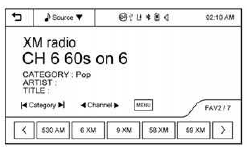
- Hold down any of the preset buttons to save the current radio station to that button of the selected favorites page.
To change a preset button, tune to the new desired radio station and hold the button
See "Storing a Station as a Favorite" in "Playing the Radio with Touchscreen" under AM-FM Radio
Setting the Clock
See Clock
Satellite Radio
If equipped, vehicles with a SiriusXM satellite radio tuner and a valid SiriusXM satellite radio subscription can receive SiriusXM programming.
SiriusXM Satellite Radio Service
SiriusXM is a satellite radio service based in the 48 contiguous United States and 10 Canadian provinces.
SiriusXM satellite radio has a wide variety of programming and commercial-free music, coast to coast, and in digital-quality sound.
A fee is required to receive the SiriusXM service.
Portable Audio Devices
There is a USB port in the storage area to the right of the infotainment system. If equipped, there is a 3.5mm (1/8 in) AUX input jack on the front of the infotainment system.
External devices such as iPods, laptop computers, MP3 players, CD changers, and USB storage devices may be connected, depending on the audio system.
See USB Port and Auxiliary Devices
Bluetooth
The Bluetooth system allows users with a Bluetooth-enabled mobile phone to make and receive hands-free calls using the vehicle audio system and controls.
The Bluetooth-enabled mobile phone must be paired with the in-vehicle Bluetooth system before it can be used in the vehicle. Not all phones will support all functions.
See Bluetooth (Voice Recognition) or Bluetooth (Infotainment Controls) or Bluetooth (Overview) and Hands-Free Phone
READ NEXT:
 Steering Wheel Controls
Some audio steering wheel controls
could differ depending on the
vehicle's options. Some audio
steering wheel controls can be
adjusted at the steering wheel.
: Press to interact with the
available
Driver Information Center (DIC)
If equipped, the DIC display is in the
instrument cluster. It shows the
status of many vehicle systems. The
controls for the DIC are on the turn
signal lever.
SET/CLR: Press to set or clear
the m
SEE MORE:
Rear output shaft seal replacement
Removal Procedure
Raise and support the vehicle. Refer to Lifting and Jacking the Vehicle
.
Drain the transfer case fluid. Refer to Transfer Case Fluid Replacement.
Remove the rear propeller shaft. Refer to Two-Piece Propeller Shaft
Replacement .
Remove the rear output shaft housing. Refer
DTC B3109-B3113: Keyless entry transmitter 1-5 battery
Diagnostic Instructions
Perform the Diagnostic System Check - Vehicle prior to using this
diagnostic procedure.
Review Strategy Based Diagnosis for an overview of the diagnostic
approach.
Diagnostic Procedure Instructions provides an overview of each
diagnostic category
DTC Descriptors
DT
