
Chevrolet Trax: Driver Information Center (DIC)
If equipped, the DIC display is in the instrument cluster. It shows the status of many vehicle systems. The controls for the DIC are on the turn signal lever.
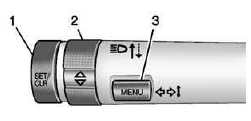
- SET/CLR: Press to set or clear the menu item displayed.
 : Use the thumbwheel
to
scroll through the items in
each menu.
: Use the thumbwheel
to
scroll through the items in
each menu.- MENU: Press to display the DIC
menus. This button is also used
to return to or exit the last
screen displayed on the DIC.
See Driver Information Center (DIC)
Rear Vision Camera (RVC)
If equipped, RVC displays a view of the area behind the vehicle, on the center stack display, when the vehicle is shifted into R (Reverse).
See Rear Vision Camera (RVC)
Parking Assist
If equipped, this system uses sensors on the rear bumper to assist with parking and avoiding objects while in R (Reverse).
It operates at speeds less than 8 km/h (5 mph). Rear Parking Assist (RPA) uses audible beeps to provide distance and system information.
Keep the sensors on the vehicle's rear bumper clean to ensure proper operation.
See Parking Assist
Power Outlets
The accessory power outlets can be used to plug in electrical equipment, such as a cell phone or MP3 player.
The vehicle has an accessory power outlet in front of the cupholders on the center stack.
See Power Outlets
Sunroof
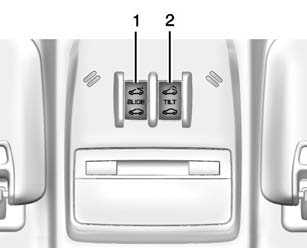
If equipped, the sunroof only operates when the ignition is turned to ON/RUN or Retained Accessory Power (RAP) is active.
Open/Close: Press and hold the front or rear of switch (1) to open or close the sunroof.
Vent: Press and hold the front or rear of switch (2) to vent or close the sunroof.
Manually close the sunshade.
The sunroof will not operate if the vehicle has an electrical failure.
See Sunroof
READ NEXT:
 Traction Control/Electronic Stability Control
If equipped, the traction control
system limits wheel spin. The
system is on when the vehicle is
started.
If equipped, the StabiliTrak system
assists with directional control of the
vehicle in diffic
Driving for Better Fuel Economy
Driving habits can affect fuel
mileage. Here are some driving tips
to get the best fuel economy
possible.
Avoid fast starts and accelerate
smoothly.
Brake gradually and avoid
abrupt stops.
Avoid
SEE MORE:
Diagnostic information and procedures
SPECIFICATIONS
FASTENER TIGHTENING SPECIFICATIONS
Fastener Tightening Specifications
BRAKE COMPONENT SPECIFICATIONS
Brake Component Specifications
BRAKE SYSTEM SPECIFICATIONS
Brake System Specifications
SCHEMATIC WIRING DIAGRAMS
HYDRAULIC BRAKE WIRING SCHEMATICS (ENCORE)
Hydraulic Brakes
Fig
Brake pedal position sensor learn
Calibration Criteria
NOTE:
Do not apply the brake pedal during the brake pedal position sensor
calibration
procedure. Any movement of the brake pedal during this procedure will cause
the calibration procedure to fail. If this occurs, the brake pedal position
sensor
calibration must be repeated.
Br
