
Chevrolet Trax: Transmission
Driver Shift Control (DSC)
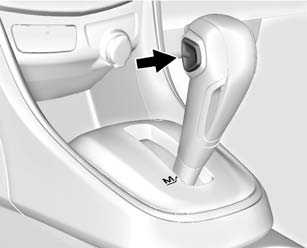
DSC allows you to shift an automatic transmission similar to a manual transmission. To use the DSC feature:
- Move the shift lever from D (Drive) rearward to M(Manual).
- Press the + (plus) end of the button on the side of the shift lever to upshift, or push the − (minus) end of the button to downshift.
See Manual Mode
Manual Transmission
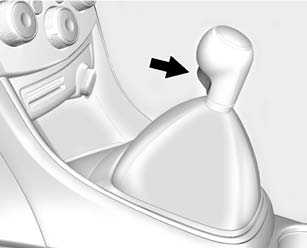
To engage R (Reverse), with the vehicle stationary, pull up on the button on the selector lever and engage the gear. If the gear does not engage, set the lever in Neutral, release the clutch pedal and apply it again; then repeat gear selection.
See Manual Transmission
Up-Shift Light
 If the vehicle has a manual
transmission, it may have an
up-shift light that indicates when to
shift to the next higher gear for the
best fuel economy
If the vehicle has a manual
transmission, it may have an
up-shift light that indicates when to
shift to the next higher gear for the
best fuel economy
See Manual Transmission
READ NEXT:
 Radio(s)
Radio Controls without
Touchscreen
/VOL: Press to turn the system
on and off. Turn to increase or
decrease the volume.
RADIO/BAND: Press to select AM,
FM, or SiriusXM (if equipped).
Seek
: Press
Steering Wheel Controls
Some audio steering wheel controls
could differ depending on the
vehicle's options. Some audio
steering wheel controls can be
adjusted at the steering wheel.
: Press to interact with the
available
SEE MORE:
DTC U0255-U0257: Lost communication with info display
Diagnostic Instructions
Perform the Diagnostic System Check - Vehicle prior to using this
diagnostic procedure.
Review Strategy Based Diagnosis for an overview of the diagnostic
approach.
Diagnostic Procedure Instructions provides an overview of each
diagnostic category.
DTC Descriptors
D
Belts (except timing belts)
On most older vehicles, the water pump is driven by a V belt or serpentine
belt on the front of the engine that is
also responsible for driving the alternator, power steering pump and air
conditioner compressor. These types of
belts are easy to inspect and replace if they are worn. You are looking
© 2019-2026 Copyright www.chevtrax.com
