
Chevrolet Trax: Headlamp replacement
Chevrolet Trax (2013-2022) Workshop Manual / Accessories & Equipment / Lighting / Lighting - Repair instructions / Headlamp replacement
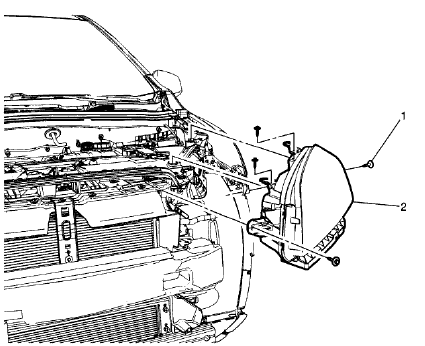
Fig. 23: Headlamp
Headlamp Replacement
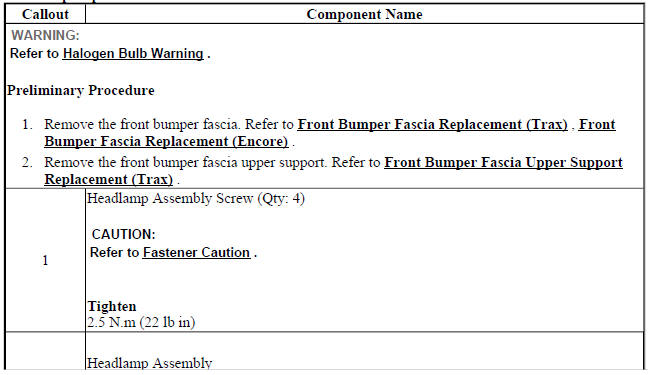
.jpg)
HEADLAMP BULB REPLACEMENT - LEFT SIDE (TRAX HIGH BEAM)
.gif)
Fig. 24: Headlamp Bulb - Left Side (High Beam)
Headlamp Bulb Replacement - Left Side (Trax High Beam)
.jpg)
.jpg)
HEADLAMP BULB REPLACEMENT - LEFT SIDE (TRAX LOW BEAM)
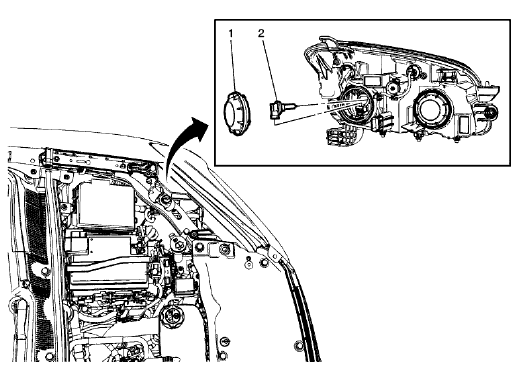
Fig. 25: Headlamp Bulb - Left Side (Low Beam)
Headlamp Bulb Replacement - Left Side (Trax Low Beam)
.jpg)
.jpg)
HEADLAMP BULB REPLACEMENT - RIGHT SIDE (HIGH BEAM)
.gif)
Fig. 26: Headlamp Bulb - Right Side (High Beam)
Headlamp Bulb Replacement - Right Side (High Beam)
.jpg)
.gif)
HEADLAMP BULB REPLACEMENT - RIGHT SIDE (LOW BEAM)
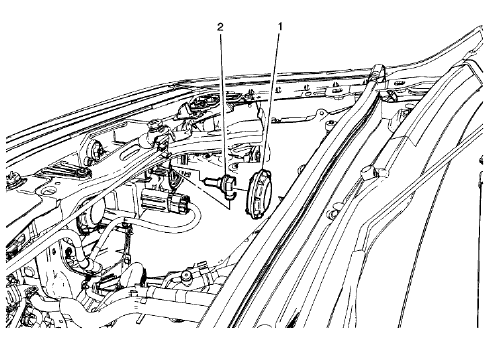
Fig. 27: Headlamp Bulb - Right Side (Low Beam)
Headlamp Bulb Replacement - Right Side (Low Beam)
.jpg)
HEADLAMP BRACKET REPLACEMENT
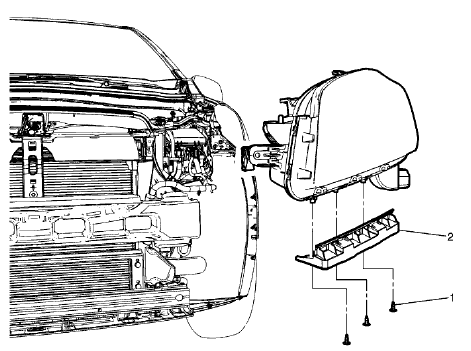
Fig. 28: Headlamp Bracket
Headlamp Bracket Replacement
.jpg)
READ NEXT:
 Headlamp aiming
Visual Aiming Preparation Procedure
NOTE: Some state and
local laws specify requirements for headlamp aim. Comply with
all of these laws when performing any headlamp aiming operations.
Headlamp aim s
Front fog lamp replacement (trax)
Fig. 33: Front Fog Lamp
Front Fog Lamp Replacement (Trax)
FRONT FOG LAMP REPLACEMENT (ENCORE)
Fig. 34: Front Fog Lamp
Front Fog Lamp Replacement (Encore)
FRONT FOG LAMP BULB REPLACEMENT (T
Fog lamp aiming
Preparation Procedure
NOTE:
Horizontal aim is not adjustable on this vehicle. Adjust the fog lamp as
required
using the adjusting screw above the projector lens on the outside of the front
bumper fas
SEE MORE:
Description and operation
DRUM BRAKE SYSTEM DESCRIPTION AND OPERATION
System Component Description
The drum brake system consists of the following:
Drum Brake Shoes
Applies mechanical output force, from hydraulic brake wheel cylinders, to
friction surfaces of brake
drums.
Brake Drums
Uses mechanical output force applied to
Park - Engine Running - Gen 2/Hybrid
6: Park -- Engine Running -- Gen 2/Hybrid Fluid Flow Diagram
Reverse (Gen 2/Hybrid)
When the gear selector lever is moved to the Reverse (R) position (from the
Park position) the normally-low
35R pressure control solenoid is commanded ON and the following changes occur in
the transmission's
hydr
© 2019-2026 Copyright www.chevtrax.com
